
Our app puts the whole of Lucky Star on your home screen: more than 11,000 casino games, our own Originals, the sportsbook and the cashier, all on the account you already use. The Lucky Star app download takes about a minute on iPhone, Android or Mac, and the LuckyStar app covers slots, live tables and sports alike; the Lucky Star casino app login uses the same details as the website, and installing it also credits 200 Lucky Points. Below are the exact steps for each device, plus the one rule that keeps your install safe: our APK comes from the official Download button and nowhere else.
Pick your device in the installer below and it shows the route that applies to you.
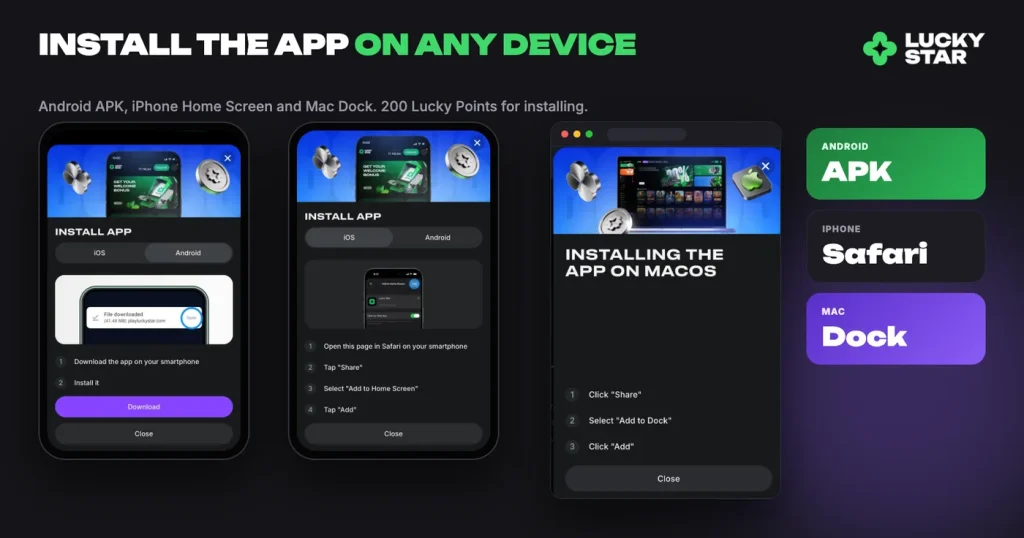
- Open Lucky Star in Safari.
- Tap Share.
- Choose Add to Home Screen.
- Tap Add. The Lucky Star icon appears on your home screen.
- Tap Get the app below, then Download.
- Open the downloaded APK file.
- Allow installation from this source if your phone asks.
- Tap Install, then open Lucky Star.
- Open Lucky Star in Safari.
- Click Share.
- Choose Add to Dock.
- Click Add. Lucky Star opens from your Dock.
Install from our official site only. 200 Lucky Points for installing the app.
What you get in the Lucky Star casino app
The app is the full platform, not a cut-down version of it. Slots, Live Casino, Quick games, Bonus Buy, Bonus Wagering and our Lucky Star Originals all open from the same lobby, and the sportsbook sits one tap away with Live, Upcoming, TOP Bets, esports and Bet history. The cashier works the same way too, so you can use Deposit, request a withdrawal and open Support chat without going back to a browser.
Your balance travels with you, because nothing about your account changes. One profile covers the casino and sportsbook together, so the app opens the same account you use on desktop. There is no second registration, no transfer step and no separate wallet.
| Device | What you install | Where it lives afterwards |
|---|---|---|
| iPhone and iPad | Our site added from Safari | Home screen icon |
| Android | Our APK file | App drawer and home screen |
| Mac (macOS) | Our site added from Safari | The Dock |
Switch notifications on too. They are a paid task: enabling them is worth 100 Lucky Points in the Free money section.
Lucky Star app on iPhone and iPad
There is no APK on iOS and no store download to wait for. Instead you add our site to the home screen, which gives you a full-screen icon that behaves like any other app.
- Open our site in Safari. The route has to be Safari, because the other iPhone browsers do not offer the same option.
- Tap Share, the square icon with the arrow pointing up.
- Scroll the list and choose Add to Home Screen.
- Confirm with Add.
The icon appears straight away. Tap it and the casino opens full screen, with the address bar gone and your session intact. If you do not see Add to Home Screen in the list, scroll further down the share sheet, since iOS often hides it below the row of apps.
Lucky Star APK download for Android: download the APK and install it
On Android you install a real APK file, so the app gets its own entry in your app drawer. The Lucky Star APK is one file for everything: there is no separate Lucky Star slots APK or sports APK to look for, and the Lucky Star casino app download always starts from our own Download button. Android asks for one permission along the way, which is normal for any file installed outside a store.
- Open the download. Tap the Download button on our site and the APK file starts saving to your device.
- Open the file. Use the notification that appears when the download finishes, or find the file in your Downloads folder.
- Allow the install. When the phone asks whether to allow installs from this source, confirm it. The prompt appears only the first time.
- Confirm and wait. Tap install and let it finish. Larger files take a few extra seconds on older handsets.
- Open the app and log in. Enter your usual details, or register if this is your first visit. The casino, sports and cashier all load from the one icon.
As a rule, Android will not continue if storage is tight, so clear a little space before you start if your device is close to full.
Lucky Star on macOS
Mac users get the same treatment as iPhone users. Open our site in Safari, click Share, choose Add to Dock and confirm with Add. The icon then sits in your Dock next to your other applications and opens the platform in its own window, which is useful if you keep a sports slip and a slot session open at the same time.
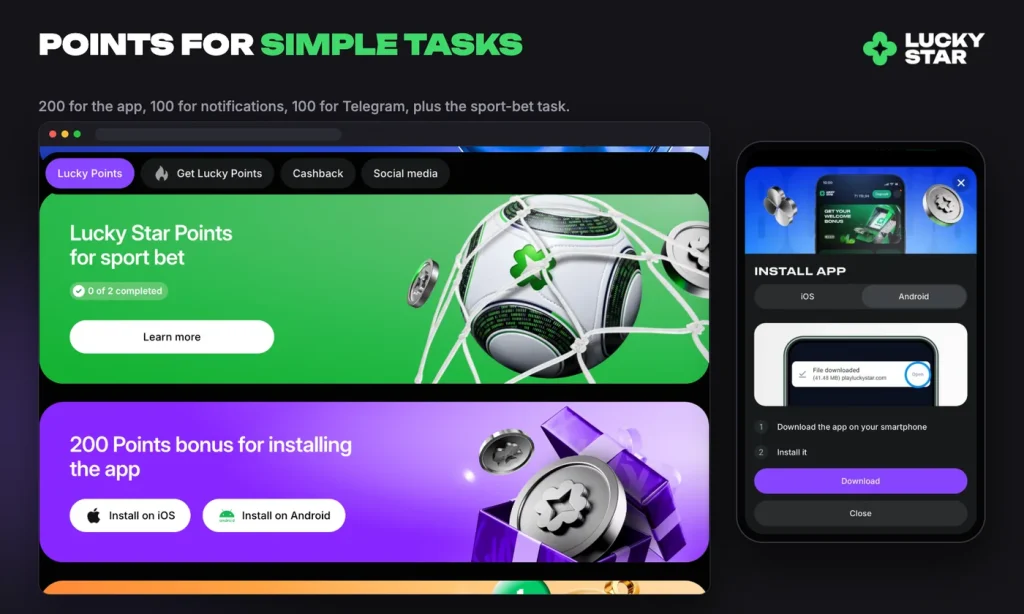
200 Lucky Points for installing the app
Installing the app is a task in the Free money section, and completing it is worth 200 Lucky Points. Enabling notifications adds another 100, and subscribing to our Telegram channel another 100, so the three smallest tasks add up to 400 points.
Points are not just decoration. Exchange starts from 1,200 points, 1,200 points convert to RM35, and the money that arrives carries x1 wagering, so it behaves almost like your own funds. You need at least one deposit before you can exchange. Beyond the tasks you also earn Lucky Points on sports bets and slot bets, at a rate of RM70 of bets for one point.
Where the real APK comes from
Keep in mind
The only APK we publish is the one behind the Download button on this official site. A Lucky Star casino app offered anywhere else is not ours, and we cannot vouch for what is inside it.
Treat this as the single safety rule of the whole process. Our file is served from our own site, your login details stay with your account, and the install takes the same path every time. If a download comes from a file-sharing link, a chat message or a search result pointing somewhere else, delete it and start again from our Download button. Nothing of value is lost by starting again.
If the install does not finish
Most failed installs come down to three ordinary causes, and all three are quick to fix.
- Not enough storage. Clear a few hundred megabytes and run the download again. Android in particular stops a package install when space runs low.
- The install permission was declined. Open your Android settings, allow installs from the source you downloaded with, then tap the APK file once more.
- The wrong browser on Apple devices. Add to Home Screen and Add to Dock live in the Safari share menu, so an iPhone or Mac install has to begin there. Keeping the system and Safari up to date avoids most of the remaining problems.
If it still refuses, check the steps to sign in once installed, or reach our team, which is available 24/7 through Support chat on the platform, by call centre, or by e-mail at [email protected]. Tell us your device and what the screen says, and we will walk through it with you.
The app is free, the install takes about a minute, and the task pays 200 Lucky Points once it is done. Players must be 18 or over.
FAQ
Is the Lucky Star app free to download?
Yes. The app is free on iPhone, Android and macOS, and installing it costs nothing. You only need an internet connection and a little free storage space on the device. The minimum deposit, if you choose to play for real money, is RM30.
Is there an iPhone app, or only Android?
Both. On iPhone and iPad you add our site to the home screen from Safari using Share and then Add to Home Screen, so there is no APK file and no separate store download. On Android you install our APK file instead.
How do I install the APK on Android?
Tap the Download button on our site to save the APK, then open the downloaded file and confirm the install. Android asks for permission to install from this source the first time, so allow it and the install continues. After that the icon sits on your home screen.
Does the app have the same bonuses as the site?
Yes. The app opens your existing account, so the welcome package, cashback, weekly offers, the Fortune wheel and your Lucky Points all work exactly as they do in a browser. Bonus conditions are shown on each bonus card in the Bonuses section.
Do I get points for installing the app?
Installing the app is a Free money task worth 200 Lucky Points, and enabling notifications is a separate task worth 100 points. Points are exchanged for real money from 1,200 points, and the exchanged money carries x1 wagering.