
Lucky Star log in takes a few seconds, and Lucky Star sign up takes about a minute. One set of details covers everything we run, so the same Lucky Star casino login and register flow opens the slots lobby, Live Casino, our Originals, the sportsbook and the cashier.
Below you will find the registration steps, how to sign in from a desktop, a mobile browser or our app, what to do if a password goes missing, and the few settings to fix on your first day. Lucky Star operates under a Curaçao gaming licence, and accounts are for players aged 18 and over.
Lucky Star register: sign up step by step
Registration asks for very little, but two answers matter later: the contact detail you register with and the currency you select. The contact detail becomes your login and your route back in if you lose the password. The currency decides which rails you can use in the cashier and which welcome offer applies to your first deposits.
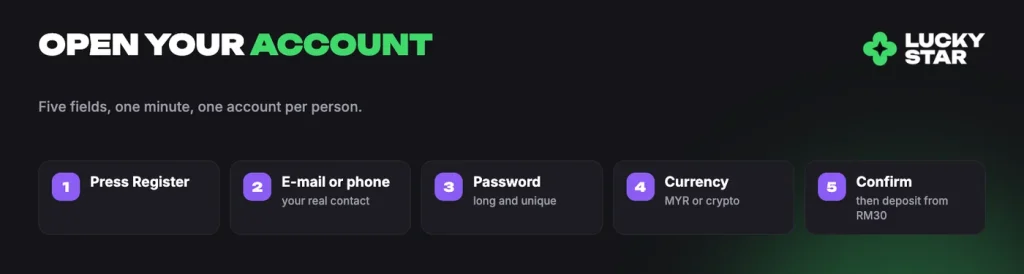
- Open Register. Press the Register button on our site or in the app to open the sign-up form.
- Enter your e-mail address or phone number. Use a real contact detail you control, because verification and password recovery both run through it.
- Set a password. Choose something long and unique that you do not use on other sites.
- Choose the account currency. Pick MYR to play in ringgit, or one of the supported cryptocurrencies.
- Confirm and sign in. Confirm the form, and your account is open with the cashier, the lobby and the sportsbook already available.
Before you continue
Choose MYR or a cryptocurrency carefully. The welcome package follows the account currency, so a ringgit account takes the 500% offer over four deposits and a crypto account the 600% version. Funds cannot cross the two types either, which means you cannot deposit in crypto and withdraw in fiat, or the other way round.
Register with your real name, residence address and phone number. We may ask you to confirm them, and the name on the account has to match every payment method you use. Picking the right currency at sign-up saves the most trouble, since the choice shapes both your deposits and your payouts from then on.
LuckyStar login on desktop, mobile and in the app
The sign-in form is the same everywhere, including the Lucky Star casino app login, so one set of details works on every screen. Enter the e-mail address or phone number you registered with, add your password, and you land back in the lobby with your balance, bonuses and bet history in place.
| Where you sign in | What to do |
|---|---|
| Desktop browser | Open our site, press Login, enter your e-mail or phone number and password. |
| Mobile browser | Open the same site on your phone, tap Login and sign in with the same details. |
| iPhone and macOS app | Add our site to the Home Screen through Safari, or to the Dock on macOS, then sign in once inside. |
| Android app | Download the APK file, install it, open the app and sign in. |
Installing the app is also a Free money task worth 200 Lucky Points, so it is the one route that pays you something for using it. Whichever device you use, a single account holds everything: there is no separate casino account and sports account to keep track of.
If you forgot your password
Use the password recovery option in the sign-in form. Follow the instructions sent to the contact details on your account, and set a fresh password from there. If you no longer have access to that contact detail, write to [email protected] from the details you registered with, or open live chat through Support, which runs 24 hours a day in all languages. Our team can guide you through recovery, but our team will never ask you for your password.
Your first day after registration
A handful of small jobs on day one make every later deposit, bonus and withdrawal smoother. None of them takes long.
- Check that the name on your account matches the bank account or e-wallet you plan to pay with.
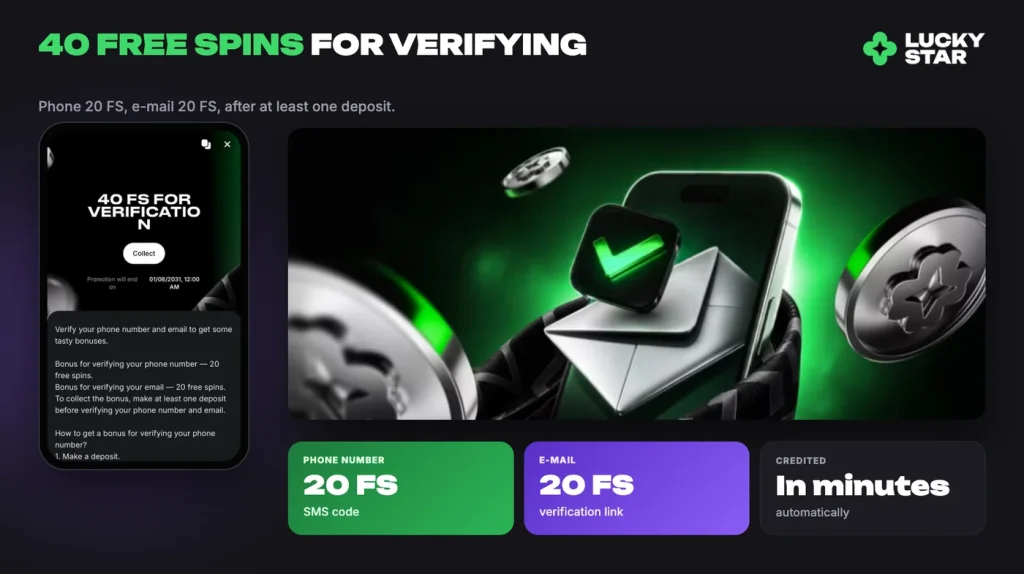
- Verify your phone number in profile settings: enter the number, press confirm, then type the SMS code.
- Verify your e-mail address in profile settings: enter the address, press Verify and follow the link.
- Decide on your bonus before you pay in, because each percentage match is tied to the deposit it applies to.
- Ask support to set deposit, spending or session limits per day, week or month if you want them in place from the start.
Verify early, for two reasons. It is required before you can request a withdrawal, remove the initial limits and reach full access to promotions, and it pays 40 free spins once you have made at least one deposit, split as 20 for the phone number and 20 for the e-mail address. The documents we may ask for and how video verification works are set out where we explain how to verify your account.
The bonus decision also belongs on day one. Our first four deposits each carry their own percentage and free spins, and the exact minimum deposit, wagering requirement, maximum bonus, time limit and free spins game sit on the bonus card itself under the i icon. Read those conditions in full before activating, or start with the arithmetic and the rules behind the welcome package. The minimum deposit is RM30.
Keeping your Lucky Star account secure
One account per person is the rule, and we enforce it. Duplicate accounts are blocked, bets from them can be annulled and withdrawals refused, and bonus eligibility is counted once per user, household, address, phone number, shared computer and shared IP address. If you ever lose access to an account, recover it rather than opening a second one.
Do not use a VPN or any other tool that hides your location while playing, and never share your login with anyone, including family. Because withdrawals go only to payment methods in your own name, a shared account creates a payout problem that no amount of support correspondence can fix.
Two habits cover most of the risk. Keep a password that you use nowhere else, and open our platform only from this official address or from the app you installed yourself. Our support team asks for verification documents when needed, never for your password, and any message that does ask for it is not from us.
What you can do once you are signed in
Everything sits behind the same account menu, so a few minutes after login are enough to find your way around.
| Section | What you do there |
|---|---|
| Deposit | Fund the account from RM30 upwards; the cashier shows the available methods and the limits for each one. |
| Bonuses | Activate an offer, check its conditions under the i icon and see which bonuses are queued. |
| Free money | Complete tasks for Lucky Points, including installing the app and enabling notifications. |
| Fortune wheel | A qualifying weekly deposit unlocks one spin a day for seven days. |
| History | Review your casino rounds. |
| Bet history | Review sports and esports bets, including bets loaded from a bet code. |
| Support | Open live chat with our team at any hour, or reach us by e-mail. |
One casino bonus and one sports bonus can be active at a time, and activating a queued bonus cancels the current one, so check Bonuses before you deposit rather than after. From there the choice is yours: more than 11,000 games in the casino, our own Lucky Jet and Mines in the Originals section, or the sportsbook with TOP Bets and esports. If you want the broader view first, see what the platform covers before you pick a starting point.
Registration takes about a minute, the minimum first deposit is RM30, and your first four deposits each carry a bonus.
FAQ
How do I register an account?
Press Register, enter your e-mail address or phone number, set a password, choose MYR or a cryptocurrency as your account currency, and confirm. Use your real name and details, because the name on the account must match every payment method you use. The minimum first deposit is RM30.
I forgot my password. How do I get back in?
Use the password recovery option in the sign-in form and follow the reset instructions sent to the e-mail address or phone number on the account. If you no longer have access to that address, write to [email protected] from the contact details you registered with, or open live chat through Support. We never ask for your password.
Can I open two accounts?
No. One account per person is allowed. Duplicate accounts are blocked, bets placed from them can be annulled and withdrawals refused. Bonus rules also count one bonus per user, household, address, phone number, shared computer and shared IP address.
Which account currency should I choose, MYR or crypto?
Choose MYR if you deposit with Malaysian rails such as FPX, Touch ‘n Go eWallet, DuitNow, GrabPay or Boost. Choose a cryptocurrency if you deposit in Bitcoin, Ethereum, Tron, Litecoin, TON, USDT or BNB. A crypto account qualifies for the 600% welcome package and a ringgit account for the 500% package, and you cannot deposit in one type and withdraw in the other.
Is there a Lucky Star app I can log in to?
Yes. On iPhone, open the site in Safari, then Share, Add to Home Screen, Add. On Android, download the APK file and install it. On macOS, use Share, Add to Dock, Add. You sign in with the same details as in the browser, and installing the app is worth 200 Lucky Points as a Free money task.